The deciding question is usually much less glamorous than video resolution: what can actually reach the spot beside your front door? If there is already usable low-voltage doorbell wiring and reliable Wi-Fi, the WiFi model is the straightforward candidate. If you can run Ethernet from a PoE switch or injector, the PoE version is the more deliberate route. Answer that before comparing a single app screenshot.
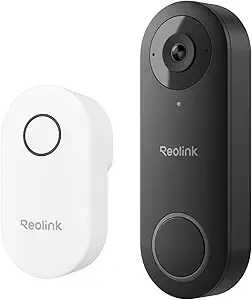
The small detail that decides this purchase
Both doorbells are always-on wired cameras. They are not the kind of product to tape beside a door and forget about. Reolink lists 12–24V AC or 24V DC as a hardwired power option for both versions. The PoE model adds a different route: a compatible IEEE 802.3af Power-over-Ethernet connection can carry power and network over one Ethernet cable.
That distinction matters more than a long row of shared features. A Wi-Fi connection is perfectly sensible when the signal at the front door is strong and the existing doorbell wiring is usable. PoE earns its extra planning when a cable route already exists, or when the front entrance is precisely the place where Wi-Fi has always been temperamental.
WiFi or PoE? Match it to the house, not the box
| Your starting point | The more natural fit | Why |
|---|---|---|
| Two existing low-voltage doorbell wires and a strong phone signal at the door | Video Doorbell WiFi | You can use the existing power route while the camera joins the home network over 2.4GHz or 5GHz Wi-Fi. Test the doorway before ordering; being close to the router on a floor plan is not the same as having a reliable signal through brick, stucco, or metal. |
| A Cat5e/Cat6 route, PoE switch, or injector is already available | Video Doorbell PoE | One Ethernet cable can provide both power and network. It is more work if no cable exists, but it removes front-door Wi-Fi from the day-to-day equation. |
| A weak or crowded Wi-Fi spot by the entrance | Video Doorbell PoE, if cabling is practical | This is the situation where PoE has a concrete benefit. It is not automatically the better product; it is the better answer to a network problem that has already shown up in that exact location. |
| Keeping the old mechanical chime is essential | Neither is an easy fit | Reolink says its wired WiFi and PoE models do not work with an existing mechanical chime. Plan on the paired Reolink chime instead, or consider a different doorbell type. |
| You want local footage rather than a cloud-first setup | Either, after checking the exact listing | Both versions support local storage options such as microSD and compatible Reolink NVRs. A card is a separate purchase, and the recording plan still deserves a decision before installation day. |
Picture the installation day before you buy
Household one: the existing-doorbell-wire setup
This is the comfortable fit for the WiFi model. There is a working transformer, two usable wires at the door, and Wi-Fi that stays reliable where a delivery driver stands. The job is still a wired installation, but the home does not need a new network cable. The detail people often miss is the chime: replacing the old button does not mean the old mechanical chime keeps doing its job. Reolink's own installation guidance says to pair the supplied Reolink chime instead.
Household two: the networked home or renovation
This is where PoE becomes attractive. If Ethernet can be brought to the door from a compatible switch or injector, the same cable handles network and power. That is not a shortcut for every house; pulling cable can be the hardest part of the whole project. But when the route exists, it is a cleaner long-term choice than buying a Wi-Fi device and hoping the entryway proves friendly to it.
Household three: no convenient wire and no appetite for electrical work
Neither of these two models should be the default recommendation. A product page can make an installation look breezy, but the wrong power plan does not become simpler after the box arrives. A battery-oriented doorbell may be a better category to research, subject to the property's rules and the trade-offs that come with charging and event-based recording.
The details worth checking after wiring is settled
Once the cable question has a real answer, the shared features become more useful: two-way audio, person detection, a paired chime, and local-recording options. Reolink also publishes 5MP imaging for these wired doorbells, but the black and white versions have different orientations of the 4:3 or 3:4 view. That is worth checking against the shape of your entrance. A narrow porch, a path leading directly to the door, and a wide driveway can call for different framing priorities.
There is one more easy-to-miss difference for buyers who care about cloud storage. Reolink's current support documentation distinguishes the WiFi and PoE models for Reolink Cloud availability. If remote cloud backup is a deciding requirement rather than a nice-to-have, verify the exact current model and service availability for your location before you place an order.
What we would not treat as a deciding feature
Do not buy either version because a marketing image makes it look like a five-minute swap. Do not choose PoE just because the word sounds more professional. And do not choose WiFi because it sounds like a cable-free camera; it still needs a usable wired power route. The boring checks are the ones that determine whether a front-door camera becomes a helpful daily tool or a half-finished weekend project.
For precise power, chime, storage, and version details, read Reolink's doorbell overview, its existing-doorbell wiring guidance, and the PoE product specifications. If you are unsure about the transformer, power route, or safe installation in your home, ask a qualified installer rather than relying on a generic buying guide.
Choose the path that matches your wiring
Use the retailer page to confirm the precise color/version, bundled chime, power requirements, current price, stock, and return terms. Do not buy a PoE model until the PoE hardware and cable route are real; do not buy the WiFi model until the front-door signal has been tested.